What Is Context Engineering? How Enterprises Turn AI Tools Into Business Results
Generative AI is no longer difficult to access.
Businesses can use powerful AI models, copilots, RAG systems, AI agents and automation tools without building everything from scratch.
But access to AI does not automatically create business value. The difficult question is no longer:
“Which AI tool should we use?”
It is:
“What does AI need to know, what can it access, what is it allowed to do, and how does it fit into a business workflow?”
That is where context engineering becomes important.
What Is Context Engineering?
Context engineering is the practice of designing, structuring and managing the information, instructions, knowledge, tools, workflow state and boundaries available to an AI system so it can reliably perform a specific task.
In simple terms:
Prompt engineering tells AI what to do. Context engineering determines what AI should know, what it can access, what it can do and what it must not do.
For enterprise AI, context can include:
- system instructions;
- user requests;
- company documents;
- proprietary knowledge;
- retrieved information;
- conversation history;
- business rules;
- APIs and tools;
- databases;
- user permissions;
- workflow state;
- memory;
- escalation rules;
- security and governance controls.
Anthropic describes context engineering as the broader discipline of curating the information available to a model during inference, including system instructions, tools, MCP, external data and message history.
Google Cloud similarly describes context engineering as creating a structured environment of data, connections and rules around AI systems rather than relying only on manually written prompts.
So the simplest definition is:
Context engineering = giving AI the right information, tools and boundaries at the right time to produce the right result.
Also read: Context Engineering: The Missing Layer Between AI Tools and Business Results
Why Does Context Engineering Matter?
An AI model can be extremely capable and still fail inside a business.
Why?
Because the model may not have the information or permissions required for the task.
Imagine a customer asks:
“Am I eligible for a refund?”
A generic AI model may know how refunds generally work.
But an enterprise system may need to know:
- the company’s current refund policy;
- the customer’s purchase;
- the product involved;
- the purchase date;
- previous refund history;
- the customer’s permissions;
- approval thresholds;
- the correct workflow;
- when a human must intervene.
The model is not the whole system.
The context around the model determines what the model can reliably do.
This creates an important distinction:
| AI Tool Mindset | Enterprise AI Mindset |
|---|---|
| Which AI tool should we buy? | Which business problem are we solving? |
| What prompt should employees use? | What context does AI need? |
| How many people use AI? | Which workflow changed? |
| How impressive is the answer? | Which KPI improved? |
| Can AI answer the question? | Can AI complete the work? |
| Can we launch a pilot? | Can we operate it in production? |
The goal is therefore not:
Use more AI.
The goal is:
Make a business process measurably better with AI.
The Four Building Blocks of Enterprise Context
A practical enterprise AI system can be understood through four fundamental context layers.
| Context layer | What it provides | Example |
|---|---|---|
| Instructions | What AI should do | Classify customer complaints |
| Knowledge | What AI should know | Policies, manuals, customer information |
| Tools | What AI can access or use | CRM, database, ticketing system |
| Rules & boundaries | What AI can and cannot do | Approval rules, PII restrictions, escalation |
These layers work together.
An AI model may be capable of reasoning about a customer complaint.
But if it cannot access the current product policy, it may produce an answer that sounds convincing but is wrong.
Give the system:
- the correct policy;
- relevant customer context;
- approved tools;
- clear permissions;
- escalation rules;
and the same underlying model can become part of a much more useful enterprise workflow.
Context Engineering vs Prompt Engineering
Prompt engineering is not dead. It is still important.
If you ask an AI model:
“Summarise this quarterly report for a CFO in five bullet points.”
The quality of your instructions can substantially affect the result.
But an enterprise AI system usually needs more than instructions.
It may need:
- internal knowledge;
- current data;
- business rules;
- user context;
- external systems;
- tools;
- permissions;
- memory;
- workflow state;
- human escalation.
That is where context engineering becomes broader than prompt engineering.
Anthropic explicitly describes context engineering as a natural progression from prompt engineering, because modern AI systems – especially agents – must manage much more than a single prompt.
Prompt Engineering vs Context Engineering
| Prompt Engineering | Context Engineering |
|---|---|
| Focuses on instructions | Focuses on the whole information environment |
| “What should I ask?” | “What should AI know?” |
| Mostly task-oriented | Often workflow-oriented |
| Improves communication | Designs the AI operating context |
| One layer | Multiple layers |
| Useful for individual AI use | Critical for enterprise AI systems |
The relationship is:
Prompt engineering is one component of context engineering.
The LEADxAI Context Engineering Framework
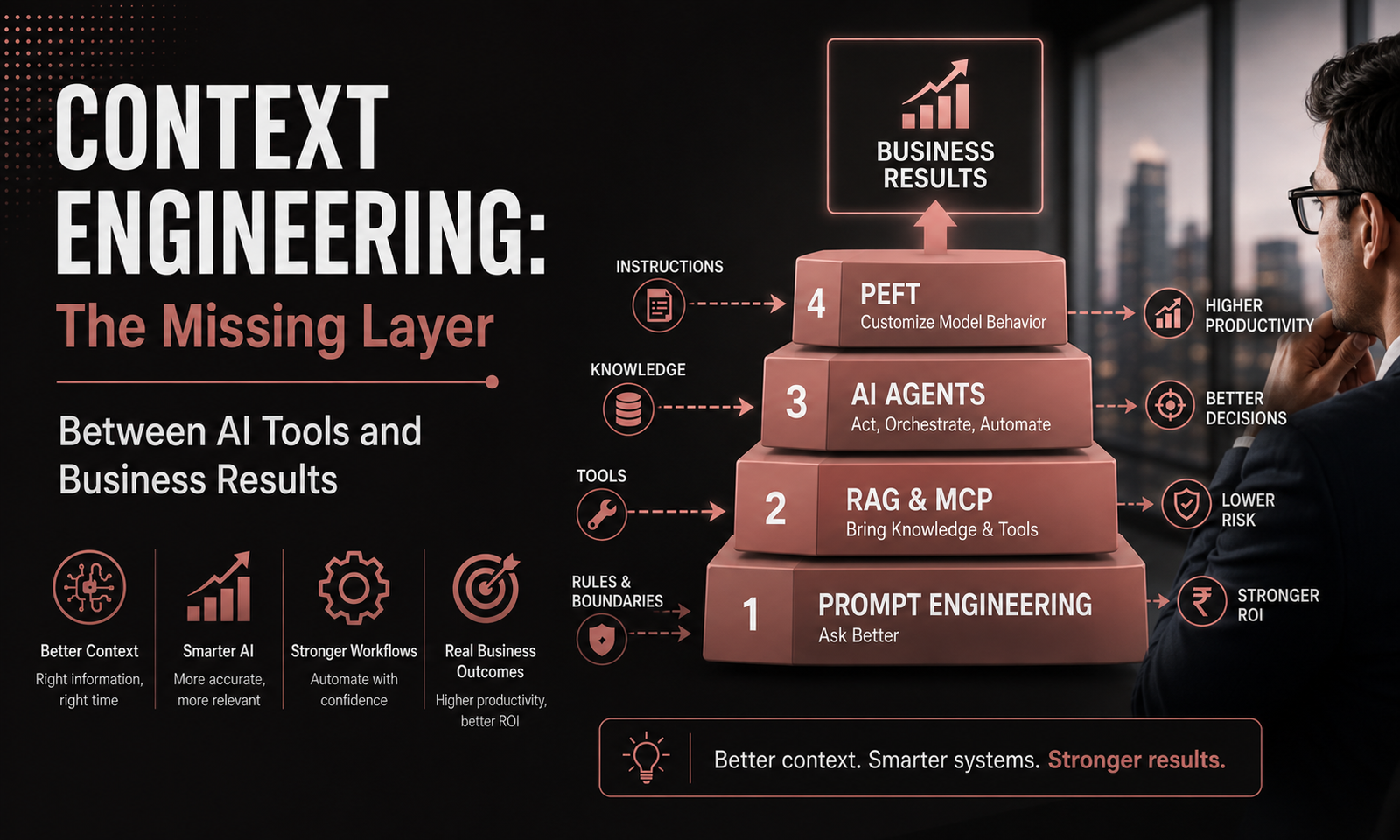
The LEADxAI framework uses a four-level maturity ladder to help business leaders understand what their organisation actually needs.
The four levels are:
Level 1 — Prompt Engineering
↓
Level 2 — RAG + MCP
↓
Level 3 — AI Agents
↓
Level 4 — PEFT
The four levels are not competing technologies. They represent increasing levels of capability. The goal is not to reach Level 4 as quickly as possible.
The goal is:
Use the simplest level that reliably solves the business problem.
Your organisation may need Level 1 for one workflow, Level 2 for another and Level 3 for a third.
A more advanced architecture is not automatically a better architecture.
| 1 | Prompt Engineering | Tell AI what to do | How do we communicate effectively with AI? |
| 2 | RAG + MCP | Give AI knowledge and tool access | How can AI use our information and systems? |
| 3 | AI Agents | Allow AI to perform multi-step work | Can AI actually perform this workflow? |
| 4 | PEFT | Customise model behaviour | Does the model itself need customisation? |
This four-pillar structure is the capability spine used in the LEADxAI curriculum.
Level 1: Prompt Engineering – Ask Better
The first level is about communication. A person gives instructions to an AI model and receives an output.
For example:
Analyse these customer complaints, identify the five most common themes and recommend an action for each theme.
A better prompt can improve:
- clarity;
- consistency;
- structure;
- tone;
- reasoning;
- output quality.
Prompt engineering is useful for:
- drafting;
- rewriting;
- summarisation;
- analysis;
- brainstorming;
- research;
- decision support;
- document interpretation;
- content creation.
But prompt engineering has a natural limitation.
A better prompt cannot automatically give an AI access to:
- your latest company policy;
- private customer records;
- internal SOPs;
- proprietary research;
- your CRM;
- your ERP;
- your approval workflow.
That creates the ceiling of Level 1.
The question at Level 1 is:
Can better instructions solve the problem?
If yes, start with prompting.
Do not build a complex AI architecture simply because a more complex architecture is available.
Level 2: RAG + MCP – Give AI Knowledge and Tools
The second level changes the environment around the model.
Instead of expecting AI to rely primarily on its existing knowledge, an organisation can provide access to relevant external information and approved enterprise systems.
This is where RAG and MCP become important.
What Is RAG?
RAG stands for Retrieval-Augmented Generation.
The basic idea is simple:
Retrieve relevant information first, then use that information to generate the answer.
Imagine an employee asks:
What is our company’s policy for approving international travel?
A generic model might produce a plausible answer.
A properly designed enterprise AI system can retrieve the relevant, current company policy and use that information when answering.
The difference is:
Without enterprise context:
Tell me our travel policy.
With RAG:
Retrieve the current approved travel policy, identify the section relevant to this employee’s situation and answer using that source.
RAG can connect AI to:
- internal policies;
- product documentation;
- SOPs;
- contracts;
- knowledge bases;
- research documents;
- customer information;
- internal reports;
- enterprise databases.
The important point is:
RAG does not replace the model. RAG supplies relevant external context to the model.
What Is MCP?
MCP stands for Model Context Protocol.
At a practical level, MCP provides a standardised way for AI applications to connect with external data sources, tools and systems.
This matters because enterprise AI often needs more than knowledge.
It may need to interact with:
- CRM systems;
- databases;
- calendars;
- ticketing systems;
- analytics platforms;
- enterprise search;
- document repositories;
- other business applications.
The practical distinction is:
RAG helps AI retrieve relevant knowledge.
MCP can help AI connect with tools and external systems.
The official MCP specification describes a protocol for connecting AI applications with external resources and tools, making it useful as part of an AI application’s context and tool-access layer.
For a business leader, the question should not be:
Should we use MCP because it is new?
The better question is:
Does our AI system need reliable access to external tools or systems, and what is the safest way to provide that access?
RAG vs MCP: What’s the Difference?
| RAG | MCP | |
|---|---|---|
| Primary purpose | Retrieve knowledge | Connect AI applications with external systems/tools |
| Main question | What should AI know? | What can AI access or use? |
| Typical use | Policies, documents, knowledge bases | CRM, databases, apps, tools |
| Main role | Context retrieval | Tool/resource connectivity |
| Example | Find the latest refund policy | Check a customer’s account |
| Level in LEADxAI | Level 2 | Level 2 |
They can work together.
For example, a customer-support AI might:
- Use RAG to retrieve the latest refund policy.
- Use an approved tool/MCP connection to check the customer’s account.
- Apply business rules.
- Draft the response.
- Escalate the case if approval is required.
That is context engineering in action.
Level 3: AI Agents — Let AI Act
The third level moves from AI that primarily responds to AI that can perform multi-step work.
A conventional AI assistant might say:
Here is the process for handling this customer request.
An AI agent could potentially:
- Understand the request.
- Retrieve the relevant policy.
- Check customer information.
- Determine the appropriate action.
- Use an approved business system.
- Generate a response.
- Escalate exceptions to a human.
- Record the outcome.
This creates a fundamental shift:
GenAI answers. Agentic AI can perform workflows.
But autonomy introduces a new requirement:
stronger context + stronger boundaries + stronger evaluation.
An enterprise AI agent needs to know:
- What is my role?
- What is my objective?
- What information can I access?
- Which tools can I use?
- What actions am I authorised to perform?
- What requires human approval?
- What should I do when information is missing?
- When should I escalate?
- How will my performance be measured?
That is why agentic AI should not be treated simply as another AI trend.
It is a workflow and governance decision.
The AI Virtual Employee Framework
The LEADxAI curriculum extends this idea through an AI Virtual Employee Framework.
An AI agent should be treated much like a role inside a business process.
The framework defines:
| Element | What it means |
|---|---|
| Role Definition | What is the agent responsible for? |
| KPI Setting | How will performance be measured? |
| Onboarding | What context, tools and rules does it receive? |
| Performance Review | How will failures and results be evaluated? |
| Iteration | How will the system improve? |
| Code of Conduct | What must the agent never do? |
| Reporting Line | Which human owns the outcome? |
For example:
Role: Customer Support L1 AI Agent
Responsibilities:
- answer routine product questions;
- retrieve approved documentation;
- classify customer requests;
- create support tickets;
- escalate complex cases.
KPIs:
- response accuracy;
- resolution time;
- escalation rate;
- cost per interaction;
- customer satisfaction.
Boundaries:
- cannot expose customer PII;
- cannot approve high-value refunds;
- cannot override security controls;
- must escalate uncertainty.
Most importantly:
Accountability never transfers to the AI. A human remains responsible for the business outcome.
The LEADxAI curriculum explicitly treats this human reporting line and accountability as part of the AI Virtual Employee Framework.
Level 4: PEFT — Customise Model Behaviour
The fourth level is different.
Instead of changing only the context around the model, organisations may sometimes need to customise the model’s behaviour itself.
PEFT stands for Parameter-Efficient Fine-Tuning.
PEFT can be relevant when an organisation has a strong reason to customise model behaviour and prompting, retrieval and workflow design are not sufficient.
But this is where leaders should be careful.
Fine-tuning is not automatically the next step after RAG.
Ask these questions first:
Can better prompting solve the problem?
If yes:
Use prompting.
Does the AI need private or frequently changing knowledge?
If yes:
Investigate RAG.
Does the AI need access to business systems?
If yes:
Investigate tools/MCP.
Does the AI need to execute a multi-step workflow?
If yes:
Investigate agents.
Does the model genuinely need specialised behaviour that these approaches cannot provide?
Then:
Investigate PEFT/fine-tuning.
The LEADxAI curriculum uses this decision logic to help leaders distinguish when prompting, RAG, agents or model customisation is appropriate.
The right question is therefore not:
Can we fine-tune our model?
It is:
What business requirement makes fine-tuning necessary?
Also read: RAG vs AI Agents vs Fine-Tuning: What Should an Enterprise Build?
More Context Does Not Always Mean Better AI
There is another important misconception.
If context improves AI performance, it is tempting to assume:
More context = better AI.
Not necessarily.
A model can be overwhelmed by:
- irrelevant information;
- duplicate information;
- outdated documents;
- contradictory instructions;
- low-quality sources;
- unnecessary history.
Good context is not the largest possible collection of information.
It is:
The right information at the right time.
Anthropic’s context-engineering guidance similarly emphasises context curation and high-signal information rather than simply filling the available context window.
For enterprise systems, ask:
- Is this information relevant?
- Is it current?
- Is the source trustworthy?
- Does the user have permission to access it?
- Does the AI actually need it?
- What happens when sources disagree?
- What happens when required information is missing?
Context engineering is therefore partly an information-management problem.
The Enterprise Context Engineering Framework
A useful way for a business leader to design an AI workflow is:
Business Problem → Instructions → Knowledge → Tools → Boundaries → AI Workflow → KPI
This sequence prevents teams from jumping directly into technology.
| Step | Leadership question | What to define |
|---|---|---|
| 1. Business Problem | What are we actually trying to improve? | Process, pain point, owner, outcome |
| 2. Instructions | What should AI do? | Role, task, output, operating rules |
| 3. Knowledge | What does AI need to know? | Documents, policies, data, history |
| 4. Tools | What does AI need to access? | CRM, ERP, databases, APIs |
| 5. Boundaries | What must AI never do? | Permissions, escalation, compliance |
| 6. AI Workflow | Where does AI fit? | Human review, automation, agentic steps |
| 7. KPI | How will we know it worked? | Time, cost, quality, revenue, risk |
1. Start With the Business Problem
Do not begin with:
Where can we use an AI agent?
Begin with:
Which workflow is expensive, slow, repetitive, error-prone or difficult to scale?
For example:
Bad problem definition:
We need an AI chatbot for customer service.
Better problem definition:
Customer-service teams spend significant time searching across product documentation and policy documents before responding to routine queries.
Now there is something measurable to improve.
This is the first principle of enterprise AI:
Start with the workflow, not the technology.
2. Define the Instructions
Next, define the AI’s role.
The system needs to know:
- what its job is;
- what a good output looks like;
- what process it should follow;
- what format it should use;
- what to do when information is missing;
- when to escalate.
This is where Prompt Engineering sits within the broader Context Engineering framework.
3. Identify the Knowledge
Ask:
What information must the AI have to perform this job correctly?
This may include:
- internal policies;
- product documentation;
- SOPs;
- customer records;
- contracts;
- research;
- knowledge bases;
- historical information.
For enterprise knowledge, RAG can retrieve relevant information when it is needed.
But the objective is not:
Give AI everything.
The objective is:
Give AI the right information for the task.
4. Identify the Right Tools
Knowledge alone is not enough when AI needs to act.
Ask:
What systems does AI need to access to complete the workflow?
For a customer-support workflow, that might be:
Knowledge base -> CRM -> Ticketing system -> Order database -> Escalation workflow
This is where tool calling and technologies such as MCP may become relevant.
5. Establish Boundaries
This is one of the most important parts of enterprise context engineering.
Define both:
What can AI do?
and:
What can AI not do?
For example:
| AI can | AI cannot |
|---|---|
| Retrieve customer information | Expose another customer’s data |
| Draft a response | Approve a high-value refund |
| Create a support ticket | Delete customer records |
| Recommend an action | Make a legally binding decision |
| Escalate an exception | Override security controls |
The goal is not maximum autonomy.
The goal is:
Appropriate autonomy.
6. Design the AI Workflow
Now connect everything:
Input → Context → AI reasoning → Action → Human review → Outcome
At this stage, you can decide whether the workflow actually needs:
- conventional automation;
- an LLM;
- RAG;
- tool calling;
- MCP;
- an AI agent;
- PEFT/fine-tuning;
- or simply better software.
This is an important leadership principle:
Not every business problem requires AI.
Sometimes a database query, workflow automation or better process design is the correct answer.
7. Define the KPI Before Deployment
Do not wait until after deployment to decide how success will be measured.
Ask:
What measurable business result will tell us this works?
Don’t stop at:
Employees like the tool.
Measure the workflow.
| Business objective | Possible KPI |
|---|---|
| Faster service | Resolution time |
| Lower cost | Cost per transaction |
| Higher productivity | Hours saved |
| Better quality | Error/rework rate |
| Better sales | Conversion rate |
| Better operations | Throughput |
| Safer AI | Escalation/error rate |
| Adoption | Active usage in target workflow |
This is where context engineering connects directly to AI ROI.
A Simple Example: From AI Chatbot to AI Workflow
Consider customer support.
A basic AI implementation may look like:
Customer question → AI generates answer
That can work for simple questions.
A context-engineered system may look like:
Customer question → Identify intent → Retrieve approved product/policy information → Check relevant customer context → Apply response rules → Use approved tools if required → Respond or escalate → Record outcome
The difference is significant.
| AI chatbot | AI workflow |
|---|---|
| Answers a question | Completes part of a business process |
| Uses available information | Retrieves relevant business context |
| Mostly conversational | Connected to business systems |
| Produces an output | Can take permitted actions |
| Success = good answer | Success = measurable business outcome |
| Human completes the process | AI + human work together |
This is the shift from:
AI as a tool
to:
AI engineered into the workflow.
Where RAG Fits Into Context Engineering
RAG sits within the knowledge layer of context engineering.
A simple relationship is:
Prompt Engineering tells AI what to do. RAG gives it the knowledge it needs to do it.
Without RAG:
User → Prompt → LLM → Answer
With RAG:
User → Query → Retrieve relevant information → LLM → Answer
The retrieved information may come from:
- policies;
- product documentation;
- SOPs;
- contracts;
- knowledge bases;
- research;
- customer information;
- enterprise databases.
But RAG is only one layer.
A complete enterprise context system can include:
| Layer | Question |
|---|---|
| Prompt Engineering | What should AI do? |
| RAG | What knowledge should AI have? |
| MCP / Tools | What systems can AI access? |
| AI Agents | What multi-step work can AI perform? |
| PEFT | Does the model need specialised behaviour? |
| Governance | What is AI allowed to do? |
This is why RAG should not be confused with the entire discipline of context engineering.
Where MCP Fits Into Context Engineering
MCP belongs primarily in the tools and systems layer.
The relationship can be expressed simply:
- Prompt engineering tells AI what to do.
- RAG gives AI knowledge.
- MCP can help AI connect to tools and systems.
- AI agents can use those capabilities to perform actions.
For an enterprise leader, the decision should not be driven by the popularity of a protocol.
Instead ask:
- Does the AI need external system access?
- What systems need to be connected?
- What permissions are required?
- What data can flow between systems?
- What actions are allowed?
- What requires human approval?
- How will the connection be monitored?
That is the level at which enterprise AI infrastructure should be evaluated.
Where AI Agents Fit Into Context Engineering
AI agents sit at Level 3 of the LEADxAI Context Engineering model.
The progression is:
Prompt Engineering → RAG + MCP → AI Agents → PEFT
The key difference is:
Can AI answer the question?
versus:
Can AI reliably complete the workflow?
An enterprise agent may need:
| Component | Purpose |
|---|---|
| Instructions | Defines role and objective |
| Knowledge | Provides relevant information |
| Tools | Enables system interaction |
| Rules & boundaries | Controls permissions and escalation |
This is why agents belong inside a broader context-engineering system.
An agent without the right context can be highly capable and still unreliable.
When Should an Enterprise Use Prompting, RAG, Agents or PEFT?
This is one of the most important decisions for an AI leader.
| If the problem is… | Consider… | Why |
|---|---|---|
| AI knows enough but needs better instructions | Prompting | Improve communication |
| AI needs private/current enterprise knowledge | RAG | Retrieve external information |
| AI needs access to systems/tools | Tools / MCP | Connect to business systems |
| AI needs to perform multi-step work | Agents | Execute workflows |
| AI needs specialised model behaviour | PEFT / fine-tuning | Customise model behaviour |
Use the lowest-complexity solution that reliably solves the problem.
The Decision Tree for Enterprise AI
Ask these questions in order.
Question 1: Does the model already have the information it needs?
- If no → consider RAG.
- If yes → continue.
Question 2: Does it need access to an external system?
If yes → consider tools/MCP.
Question 3: Does it need to perform multiple steps or actions?
If yes → consider an AI agent.
Question 4: Does the model itself need specialised behaviour?
If yes → investigate PEFT/fine-tuning.
Question 5: Can the problem be solved more simply without AI?
If yes → don’t use AI just because you can.
This is the kind of decision-making that prevents unnecessary enterprise AI complexity.
Common Context Engineering Mistakes
Mistake 1: Starting With the AI Tool
“We bought an AI platform. Now where can we use it?”
Wrong order.
Start with the business problem.
Mistake 2: Giving AI Too Much Context
- More documents do not automatically create better answers.
- Irrelevant or contradictory context can reduce reliability.
Mistake 3: Using RAG When Prompting Is Enough
If the model already has the necessary information, a retrieval system may add unnecessary complexity.
Mistake 4: Using Fine-Tuning to Solve a Knowledge Problem
If the problem is:
“The model doesn’t know our latest policy.”
The first question should usually be whether retrieval/context is the appropriate solution—not whether the model should be fine-tuned.
Mistake 5: Giving Agents Too Many Tools
Every additional tool can increase complexity, permissions and potential failure modes.
Give agents only the tools required for their role.
Mistake 6: No Human Escalation
An enterprise system should know what to do when:
- information is missing;
- sources conflict;
- confidence is low;
- the action is high-risk;
- approval is required.
Mistake 7: Measuring AI Usage Instead of Business Results
Number of prompts is not a business KPI.
Neither is the number of employees who opened an AI tool.
Measure the workflow.
Mistake 8: Building Before Defining the Process
A technically impressive AI system can still automate a broken process.
Fix the process first.
Then decide where AI belongs.
Context Engineering and Enterprise AI ROI
Context engineering matters because it connects AI capability to measurable business outcomes.
The LEADxAI approach uses an AI ROI Engine built around four steps:
1. Metrics
Create standard efficiency metrics for the workflow.
2. Prioritize
Identify which KPI matters most.
3. Automate
Determine where AI can improve or automate the process.
4. Deploy & Track
Deploy the solution, measure it and iterate.
The curriculum defines this as the AI ROI Engine: Metrics → Prioritize → Automate → Deploy & Track.
The key equation is:
AI capability → workflow change → KPI improvement → business outcome
For example:
AI capability: RAG-powered support assistant
↓
Workflow change: Agents spend less time searching documentation
↓
KPI: Average handling time
↓
Business outcome: Higher support capacity without proportional headcount growth
That is much more meaningful than simply saying:
“Our employees use AI.”
Context Engineering for Different Business Functions
Context engineering is not limited to technology teams.
Customer Support
AI may need:
- product documentation;
- customer information;
- support policies;
- ticketing systems;
- escalation rules.
Sales
AI may need:
- CRM data;
- account history;
- product information;
- pricing rules;
- approved messaging;
- sales workflows.
HR
AI may need:
- HR policies;
- employee handbooks;
- benefits information;
- organisational rules;
- privacy boundaries.
Finance
AI may need:
- financial documents;
- reporting policies;
- approval thresholds;
- structured financial data;
- audit requirements.
Operations
AI may need:
- SOPs;
- process data;
- operational systems;
- exception rules;
- performance metrics.
The technology may differ.
The underlying context-engineering questions remain the same.
A Practical Enterprise Context Engineering Checklist
Before deploying an AI workflow, ask:
Business
- Is the business problem clearly defined?
- Is there a process owner?
- Is the expected outcome measurable?
- Is AI actually necessary?
Instructions
- Is the AI’s role clearly defined?
- Are the expected outputs clear?
- Are failure conditions defined?
Knowledge
- What information does AI need?
- Are the sources trustworthy?
- Is the information current?
- Does the AI need RAG?
Tools
- What systems must AI access?
- Are permissions clearly defined?
- Is MCP or another integration approach appropriate?
Agents
- Does the workflow actually require autonomy?
- What actions can the agent perform?
- What requires approval?
- When must it escalate?
Governance
- What data can AI access?
- What data is prohibited?
- Are PII and security controls defined?
- Is human accountability clear?
Measurement
- What KPI defines success?
- What is the baseline?
- How will errors be measured?
- How will cost be tracked?
- When will the system be reviewed?
The Most Important Principle in Context Engineering
There is a temptation in enterprise AI to continuously move toward more sophisticated technology.
- Prompting feels basic.
- RAG feels more advanced.
- Agents feel more advanced again.
- Fine-tuning sounds even more sophisticated.
- But sophistication is not the objective.
The objective is:
Reliable business results.
A simple prompt can be the right solution.
A RAG system can be the right solution.
An agent can be the right solution.
Fine-tuning can be the right solution.
Sometimes the correct solution is not AI at all.
The best enterprise AI leaders are not the people who choose the most complicated architecture.
They are the people who choose the right architecture for the problem.
Context Engineering: From Prompt to Business Result
The full progression can be understood as:
Prompt
↓
Knowledge
↓
Tools
↓
Action
↓
Governance
↓
Measurement
↓
Business Result
Or, in the LEADxAI four-level framework:
Level 1 — Ask Better
↓
Level 2 — Know + Connect
↓
Level 3 — Act
↓
Level 4 — Customise
The objective is not to reach Level 4.
The objective is to reach the level that solves the business problem reliably.