AI Agents in the Enterprise: What They Can Actually Do – and Where They Fail
AI agents are moving enterprise AI from answering questions to performing work.
But there is an important distinction between an AI agent that looks impressive in a demo and one that can safely operate inside a real business.
An enterprise AI agent may retrieve information, reason through a multi-step task, use business tools, update systems, coordinate workflows and escalate exceptions to people.
That does not mean every enterprise should deploy autonomous agents everywhere.
The real question for a CIO, CTO, CXO or business leader is:
What should an AI agent actually be allowed to do, what should remain with humans, and how do we prove that the agent is creating measurable business value?
That is where the enterprise conversation about AI agents needs to move.
- Away from demos.
- Away from hype.
- And toward workflows, context, governance, economics and outcomes.
What are AI agents in the enterprise?
AI agents in the enterprise are AI-powered systems that can understand a business objective, work through multiple steps, access authorised information and tools, take defined actions, and escalate situations that fall outside their boundaries.
A traditional generative AI interaction usually looks like:
Prompt → Response
An enterprise AI agent can look more like:
Goal → Understand → Retrieve → Reason → Use tools → Act → Verify → Escalate or Complete
That difference is fundamental.
Consider a customer-support example.
A conventional AI assistant might answer:
“What is our refund policy?”
An AI agent could potentially:
- Identify the customer’s request.
- Retrieve the relevant policy.
- Access the customer’s account.
- Check eligibility.
- Calculate the applicable refund.
- Create a service request.
- Update the CRM.
- Send an approved response.
- Escalate unusual cases to a human.
The AI is no longer simply talking about the work.
It is participating in the work.
That is the promise of enterprise agentic AI.
AI Agents vs Chatbots: What’s the Difference?
The simplest distinction is agency.
| Capability | AI Chatbot | Enterprise AI Agent |
|---|---|---|
| Answer questions | ✓ | ✓ |
| Generate content | ✓ | ✓ |
| Retrieve information | Sometimes | ✓ |
| Plan multiple steps | Limited | ✓ |
| Use business tools | Limited | ✓ |
| Execute actions | Limited | ✓ |
| Orchestrate workflows | Limited | ✓ |
| Handle exceptions | Basic | ✓ |
| Operate autonomously | Usually limited | Within defined boundaries |
| Human escalation | Optional | Should be designed into workflow |
So, an AI agent is not simply a better chatbot.
It is better understood as an AI-enabled workflow system.
This distinction becomes especially important once the system has permission to modify records, send communications, initiate transactions or interact with enterprise applications.
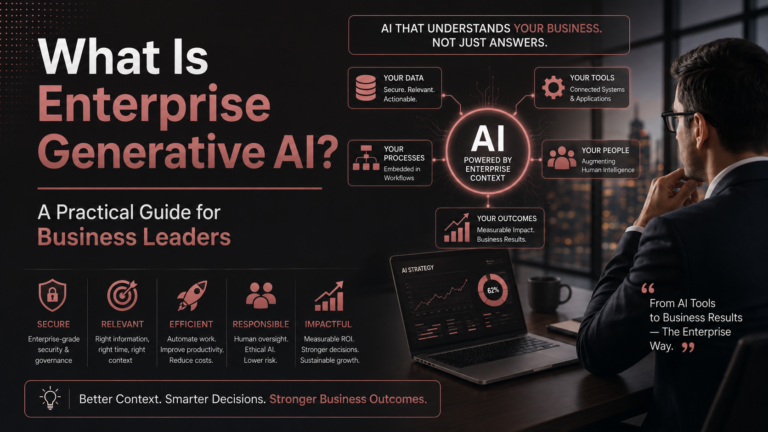
Also read: What Is Enterprise Generative AI? Definition, Use Cases, Architecture & Strategy
What Can Enterprise AI Agents Actually Do?
The best enterprise AI agent use cases aren’t necessarily the most futuristic ones.
They are usually workflows where there is:
- high transaction volume;
- repetitive work;
- multiple steps;
- large amounts of information;
- clearly defined rules;
- measurable outcomes;
- appropriate access to enterprise systems.
Here are some practical examples.
1. Customer Service AI Agents
A customer service agent can potentially:
- understand customer requests;
- retrieve product information;
- search policies;
- access customer history;
- classify cases;
- create tickets;
- update CRM records;
- draft responses;
- route complex cases to human teams.
The opportunity is not merely reducing the number of conversations handled by humans.
It is reducing the amount of manual work surrounding each conversation.
2. Sales AI Agents
Enterprise sales agents can support:
- account research;
- prospect research;
- opportunity analysis;
- meeting preparation;
- CRM updates;
- proposal preparation;
- follow-up workflows;
- customer-history analysis.
For example, instead of asking a salesperson to manually research an account before a meeting, an agent could gather information from approved sources and prepare a structured briefing.
The salesperson remains responsible for the relationship and decision.
The agent handles the preparation work.
3. HR AI Agents
HR is another area where agents can support structured workflows.
Potential use cases include:
- employee policy assistance;
- onboarding;
- candidate coordination;
- interview scheduling;
- document retrieval;
- HR ticket classification;
- employee-service workflows.
However, sensitive employment decisions require considerably more governance than a routine information-retrieval task.
This is where risk-based autonomy becomes important.
4. IT Service Management
AI agents can potentially help IT teams with:
- ticket classification;
- incident triage;
- knowledge retrieval;
- troubleshooting;
- root-cause investigation;
- standard remediation;
- escalation.
For low-risk incidents, the agent might perform defined actions automatically.
For high-risk incidents, it may only analyse the situation and recommend the next step.
5. Finance and Operations
Agents can assist with:
- invoice processing;
- document analysis;
- reconciliation support;
- exception identification;
- report preparation;
- operational research;
- workflow routing.
The key is to separate assistance from authorisation.
An AI agent might prepare a recommendation.
That does not mean it should automatically approve a high-value financial transaction.
Where AI Agents Fit in Enterprise AI Architecture
This is where many organisations make their first strategic mistake.
They treat AI agents as the starting point.
They shouldn’t.
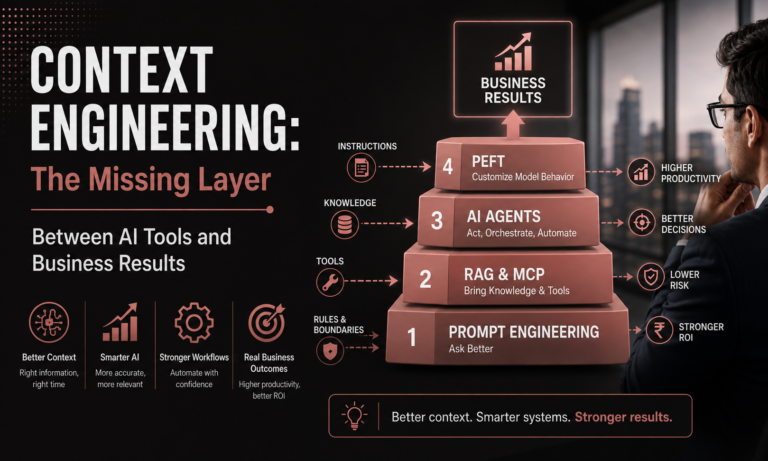
The LEADxAI Context Engineering™ model places AI Agents at Level 3:
Level 1 — Prompt Engineering
Ask better.
Level 2 — RAG + MCP
Bring enterprise knowledge and tools to AI.
Level 3 — AI Agents
Let AI perform multi-step work.
Level 4 — PEFT
Customise the model when deeper model-level adaptation is actually required.
This creates an important enterprise decision rule:
Don’t use an AI agent simply because an AI agent is available. Use one when the business workflow genuinely requires planning, tool use and multi-step action.
- If better prompting solves the problem, improve the prompt.
- If the problem is access to company knowledge, evaluate RAG.
- If the system needs tools, introduce appropriate tool integration.
- If it needs to execute multiple steps, then an agent becomes relevant.
This is a much more disciplined way to approach enterprise GenAI.
Also read: Generative AI & RAG Explained – Sudhanshu Saxena’s Enterprise Approach
What Does an Enterprise AI Agent Need?
An enterprise AI agent typically needs five critical layers.
1. A Clear Objective
The agent needs a specific responsibility.
“Improve customer service” is too vague.
“Resolve routine product-support requests using approved knowledge and escalate exceptions” is much better.
2. Reliable Context
AI agents need the right information at the right time.
That can include:
- policies;
- SOPs;
- customer information;
- product documentation;
- contracts;
- databases;
- internal knowledge;
- previous interactions.
This is where Retrieval-Augmented Generation (RAG) can become valuable.
But RAG does not magically fix bad enterprise data.
If the source information is outdated, incomplete or contradictory, the agent can still produce a bad result.
3. Access to Tools
An agent becomes substantially more useful when it can interact with authorised business systems.
Examples include:
- CRM;
- ERP;
- ticketing systems;
- databases;
- calendars;
- enterprise search;
- analytics platforms;
- internal applications.
The question shouldn’t simply be:
“How do we connect the agent to everything?”
It should be:
“What does this agent genuinely need access to—and what should it never be allowed to access?”
That distinction is fundamental to enterprise AI security.
4. Rules and Guardrails
Every enterprise agent needs boundaries.
For example:
| Agent may | Agent may not |
|---|---|
| Retrieve customer information | Access unauthorised records |
| Draft a refund | Approve unlimited refunds |
| Create support tickets | Delete historical records |
| Recommend an action | Override mandatory approval |
| Update permitted CRM fields | Modify restricted fields |
| Escalate exceptions | Bypass governance |
The more autonomy an agent receives, the more important permissions, monitoring, auditability and escalation become.
5. Human Accountability
The final layer is often overlooked.
Who owns the outcome?
The AI agent doesn’t.
Someone in the organisation must own:
- the workflow;
- the KPI;
- the agent’s permissions;
- the escalation rules;
- the risk profile;
- the business outcome.
LEADxAI’s operating model similarly treats AI as an organisational capability requiring defined roles, KPIs, onboarding, governance and accountability—not simply another software subscription.
Also read: What Is Context Engineering? How Enterprises Turn AI Tools Into Business Results
Where Do Enterprise AI Agents Fail?
This is the part that deserves more attention.
The biggest enterprise AI agent failures don’t always happen because the underlying model is incapable.
They often happen because organisations give the agent:
the wrong objective, poor context, excessive permissions, unclear ownership or no measurable business case.
Let’s examine the most important failure modes.
Failure 1: The Business Problem Was Never Clearly Defined
A company announces:
“We’re building an AI agent.”
But nobody can explain:
- what process it replaces;
- what problem it solves;
- what KPI improves;
- what the agent costs;
- when the organisation should stop the project.
That’s not an AI strategy.
That’s technology experimentation.
A better sequence is:
Business problem → Workflow → Use case → Architecture → Agent
Not:
New AI technology → Find somewhere to use it
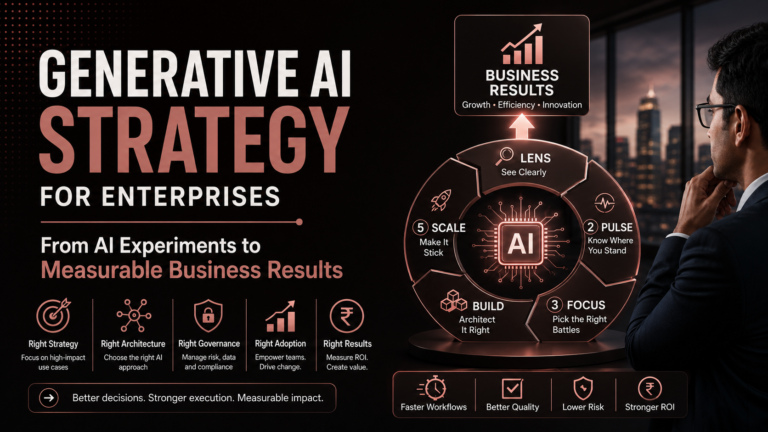
LEADxAI’s FOCUS™ framework follows this decision-oriented approach by looking at use-case discovery, impact versus feasibility, adoption, ROI and kill criteria.
Failure 2: The Agent Has the Wrong Context
An AI agent can make a confident decision using incomplete information.
Imagine an HR agent asked:
“Is this employee eligible for this benefit?”
If it retrieves an outdated policy, its answer may sound perfectly reasonable.
It can still be wrong.
This is why enterprise AI requires data readiness, not simply model access.
Before deploying an agent, ask:
If the AI accessed our enterprise information today, would we trust what it retrieved?
If the answer is no, the organisation has a data-readiness problem.
Failure 3: The POC Worked—Production Didn’t
This is one of the most common enterprise AI traps.
A proof of concept answers:
Can this work?
Production asks:
Can this work reliably, securely and economically at scale?
Those are completely different questions.
Production introduces:
- security;
- permissions;
- integrations;
- monitoring;
- evaluation;
- cost;
- data quality;
- governance;
- support;
- user adoption.
LEADxAI explicitly identifies the POC-to-production gap as a critical enterprise failure zone and includes security, PII, RBAC, cost and production-readiness considerations in its BUILD™ framework.
Failure 4: Too Much Autonomy Too Soon
This is perhaps the most dangerous mistake.
The question should not be:
“How much can we automate?”
Instead:
“How much autonomy has the agent earned?”
A sensible progression is:
Assist → Recommend → Execute with approval → Execute within boundaries → Orchestrate
For example:
- Level 1: The agent recommends an action.
- Level 2: A human approves it.
- Level 3: The agent executes low-risk actions automatically.
- Level 4: The agent handles defined exceptions.
- Level 5: The agent orchestrates multiple workflows.
- Autonomy should increase with evidence.
- Not excitement.
Failure 5: Governance Comes Too Late
A common enterprise sequence is:
Build → Demo → Security Review → Redesign
That is expensive.
Security, compliance and legal requirements should influence the use case before the architecture is locked.
This is why the LEADxAI FOCUS™ framework explicitly brings legal, security and compliance considerations into use-case prioritisation rather than treating governance as a final checkpoint.
The principle is simple:
Move governance left.
Failure 6: The Organisation Measures AI Activity Instead of Business Value
“Twenty AI agents deployed.”
Sounds impressive.
But what did they accomplish?
A stronger enterprise dashboard would measure:
- processing time;
- cost per transaction;
- error rate;
- throughput;
- SLA compliance;
- customer satisfaction;
- employee productivity;
- revenue impact;
- human escalation rate.
The important metric isn’t:
How much AI did we deploy?
It is:
What became measurably better?
Failure 7: Employees Don’t Trust the Agent
Technology can work perfectly and still fail adoption.
Employees may think:
- “The AI gets things wrong.”
- “I don’t know when I should trust it.”
- “My manager doesn’t want us using it.”
- “It’s slower than my existing process.”
- “Who gets blamed if the AI makes a mistake?”
This is why enterprise AI is also a change-management problem.
LEADxAI’s SCALE™ framework addresses adoption through AI champions, change management, functional KPIs, usage policies and organisational operating rhythms.
Failure 8: An AI Agent Was Used Where Normal Automation Was Better
Not every workflow requires agentic AI.
Suppose the rule is:
If invoice value exceeds ₹1 lakh, send it for manager approval.
A deterministic workflow may be better.
It can be:
- cheaper;
- faster;
- predictable;
- easier to audit;
- easier to govern.
AI agents become more compelling when the workflow contains:
- unstructured information;
- interpretation;
- dynamic decisions;
- multiple contextual steps;
- changing information;
- tool interaction.
Don’t make an AI agent solve a problem that ordinary software already solves well.
Failure 9: Nobody Owns the Outcome
An agent makes an incorrect recommendation.
Who is responsible?
The AI vendor?
The technology team?
The innovation team?
The business unit?
The manager?
This cannot be decided after something goes wrong.
Every enterprise agent should have a clearly identified business owner.
That owner should understand:
- the purpose;
- the KPI;
- permissions;
- risks;
- escalation;
- economics;
- stop criteria.
What Makes a Good Enterprise AI Agent Use Case?
Before building an agent, score the workflow.
| Criterion | Strong candidate |
|---|---|
| Transaction volume | High |
| Repetitiveness | High |
| Number of workflow steps | Multiple |
| Information requirements | Significant |
| Rules | Clearly defined |
| System access | Available |
| Business outcome | Measurable |
| Risk | Manageable |
| Human escalation | Available |
| Business owner | Identified |
The strongest candidates usually sit where:
High business impact × reasonable technical feasibility × measurable outcome
That’s much more useful than creating a list of hundreds of fashionable AI use cases.
AI Agents vs RAG vs Fine-Tuning: What Should an Enterprise Choose?
This is one of the most important decisions for enterprise AI leaders.
| Enterprise problem | Likely capability |
|---|---|
| AI doesn’t understand the instruction | Prompt Engineering |
| AI needs private enterprise knowledge | RAG |
| AI needs access to external tools | Tool integration / MCP |
| AI needs to perform multi-step work | AI Agents |
| AI needs specialised model behaviour | PEFT / Fine-tuning |
The key is to diagnose the problem before choosing the technology.
The LEADxAI Context Engineering™ ladder uses precisely this principle to help leaders decide whether the next step is better prompting, enterprise context, agents or model customisation.
Also read: AI Agents & Agentic RAG – Advanced Generative AI by Sudhanshu Saxena
How Should Enterprises Measure AI Agent ROI?
Start with a baseline.
For example:
| KPI | Before Agent | Target |
|---|---|---|
| Processing time | 30 min | 10 min |
| Manual steps | 12 | 5 |
| Error rate | 8% | <3% |
| Human escalations | 100% | 25% |
| Cost/transaction | ₹X | ₹Y |
| SLA compliance | 82% | 95% |
The exact KPIs depend on the workflow.
But the principle remains:
Measure the business process—not the AI model.
If the agent cannot produce a measurable improvement in the process, the business case needs to be questioned.
A Practical Framework for Deploying Enterprise AI Agents
Step 1: Identify the workflow
Find a real business process with measurable pain.
Step 2: Assess readiness
Evaluate:
- data;
- process;
- technology;
- skills;
- security;
- governance.
Step 3: Decide whether an agent is actually required
Compare:
Prompting vs RAG vs Automation vs Agent vs Fine-tuning
Step 4: Define boundaries
Specify:
- what the agent can access;
- what it can change;
- what requires approval;
- when it must escalate.
Step 5: Pilot narrowly
Start with one workflow.
Don’t attempt enterprise-wide autonomy on day one.
Step 6: Measure
Track:
- accuracy;
- cost;
- time;
- adoption;
- exceptions;
- business outcome.
Step 7: Scale—or stop
If the economics and performance work:
Scale.
If they don’t:
Redesign or stop.
Kill criteria are not a failure.
They are part of responsible AI investment.
The Future of Enterprise AI Is Not “Fully Autonomous”
There is a tendency to imagine the future as:
Human → AI does everything
Enterprise reality will probably be more nuanced.
A more useful model is:
Human + AI + Tools + Data + Governance
The most successful organisations will not necessarily be those that give AI the greatest autonomy.
They will be the organisations that know where autonomy creates value and where human judgement remains essential.
That’s the strategic difference.